

UI Placeholder Image Generator: The Ultimate Free Tool for Designers & Developers
UI Placeholder Image Generator is a professional tool for creating custom placeholder images. Support custom dimensions, colors, text with PNG/JPEG output. Fast, free, and privacy-focused.
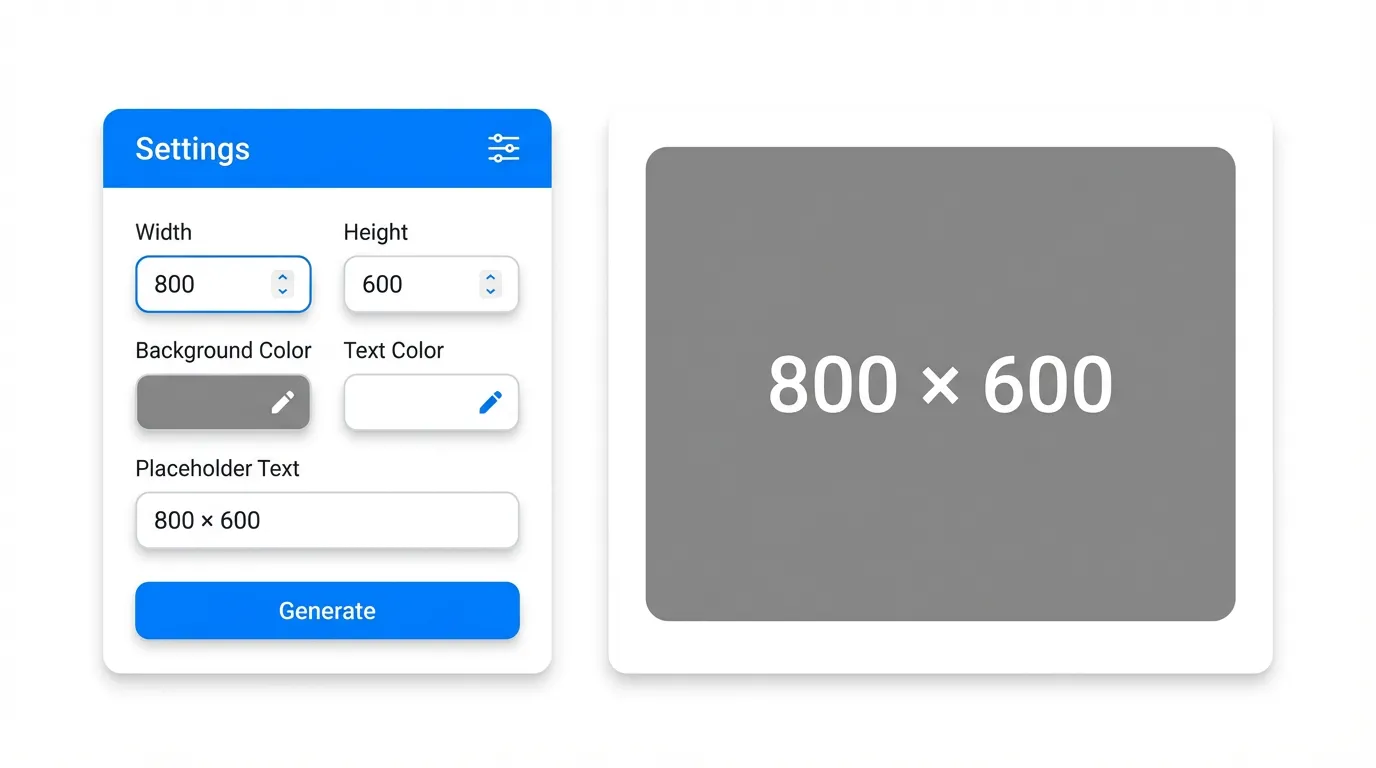
Have you ever spent hours searching for placeholder images that match your exact dimensions? Do these scenarios sound familiar:
- Your mockup needs image placeholders, but the real images aren’t ready yet
- Need different dimension placeholders to test responsive layouts
- Found a placeholder site, but it requires registration or charges fees
- Downloaded placeholders that don’t match your design style
I’ve been through all these frustrations. That’s why I built the UI Placeholder Image Generator - now I can generate perfectly matched placeholders in 3 seconds.
Why Your Placeholder Images Keep Failing
Many designers and developers rely on Google Images or simple colored boxes. Here’s why this approach fails:
First, inaccurate dimensions. Real placeholders must match your design specs exactly. Using an 800×600 placeholder when you actually need 750×420 means complete layout readjustment when you replace with real images.
Second, missing context. Plain gray boxes don’t communicate what should be there. Professional placeholders should display dimension information so developers, testers, and clients immediately understand the image specifications.
Third, inconsistent style. Placeholders across your project should maintain consistent visual style - same background color, font styling. This looks professional during reviews instead of mismatched, random placeholders.
The root cause? You’re not using a professional UI Placeholder Image Generator tool.
3 Core Advantages of Our UI Placeholder Generator
Compared to traditional approaches, our Online Placeholder Tool offers three unbeatable advantages:
1. Fully Customizable for ALL Design Scenarios
Our UI Placeholder Generator supports any dimension from 1×1 to 5000×5000 pixels. Input exact dimensions your project requires. Plus customize background and text colors to perfectly match your design.
Need a dark blue background with white text? Or light gray with dark gray font? One-click configuration. This flexibility is unmatched by any other placeholder tool.
2. Professional Output for Better Team Collaboration
The generator automatically displays dimension information centered in the image with optimal font sizing for readability. Whether during design reviews, development handoff, or client presentations, everyone instantly understands each image’s specifications.
Even better - we support Base64 encoding copy feature. Frontend developers can directly paste Base64 into CSS, eliminating separate image files and streamlining workflow. This developer-friendly feature is what makes our free placeholder tool truly professional.
3. Pure Frontend Processing for Privacy & Security
Many online tools upload your data to servers, creating privacy risks. Our Online Placeholder Generator processes everything in the browser canvas - zero data uploads, keeping your design concepts completely confidential.
Frontend processing also delivers faster response times. Click “Generate Image” and see results in milliseconds - much faster than server-dependent tools.
Step-by-Step Tutorial: Generate Professional Placeholders in 3 Steps
Using the UI Placeholder Generator is incredibly simple:
Step 1: Set Image Dimensions
Input width and height in the left settings panel. The tool includes quick presets:
- 1920×1080 (fullscreen backgrounds)
- 1280×720 (hero images)
- 800×600 (standard content)
- 640×480 (thumbnails)
- 400×300 (small icons)
- 300×200 (thumbnails)
Step 2: Choose Colors and Text
Background Color: Default #cccccc (medium gray). Click the color picker or enter HEX values. Use colors matching your design - #2d3748 for dark themes, #f7fafc for light themes.
Text Color: Default #666666 for optimal contrast. For dark backgrounds use light gray #e2e8f0, light backgrounds use dark gray #4a5568.
Text Content: Auto-shows dimensions (e.g., “800 × 600”) or customize text like “Product Image”, “Banner”, etc.
Step 3: Generate and Download
Click “Generate Image” - preview displays immediately on the right.
- Click “Download Image” to save as PNG or JPEG
- Or click “Copy” under the Base64 field to paste directly into code
The entire process takes under 10 seconds - far faster than searching and downloading.
Advanced Tips: Make Your Placeholders More Professional
Master these pro tips:
Tip 1: Standardize Specifications
Same-module images should have uniform dimensions. For product listings, use 400×300 for all products. Generate a consistent set of placeholders to maintain visual uniformity.
Tip 2: Align with Design Systems
If your project uses a design system, set placeholder background to neutral colors and text to system text colors. This makes placeholders fully compliant with design guidelines and more valuable for reviews.
Tip 3: Frontend Base64 Embedding
For small placeholders, copy Base64 and embed directly in HTML/CSS. This approach:
- Reduces HTTP requests
- Eliminates image loading delays
- Requires no extra assets for demos
Extremely useful for frontend development and prototyping.
FAQ: Common Questions About UI Placeholder Generator
Q1: Does it support SVG format?
Currently focused on PNG and JPEG for maximum compatibility across all scenarios. SVG placeholder demand is being evaluated for potential future updates.
Q2: Can I generate gradient backgrounds?
Current version supports solid colors. Gradient backgrounds have limited practical use cases - solid placeholders better communicate layout and dimensions.
Q3: Text content limitations?
Keep it under 20 characters ideally. The tool auto-adjusts font size for dimensions, but longer text reduces readability.
Q4: Image clarity?
All placeholders generate at 100% quality, ensuring crisp display on any device - even at extra-large dimensions.
Q5: Ideal Base64 image sizes?
Base64 works best for small images (under 500px). Large images create extremely long Base64 strings, hurting code readability. Download larger images as files.
Conclusion: Start Boosting Your Design Efficiency Today
The UI Placeholder Image Generator has become my essential design/development tool. It solves all traditional placeholder pain points: inaccurate dimensions, inconsistent style, low acquisition efficiency. Most importantly, it precisely matches each project’s specific requirements.
Let this tool help you improve efficiency:
👉 Start Using UI Placeholder Generator Now
No registration, completely free, works in any browser. Trust me, you won’t want to work without it after trying it.